
Today, we’re looking at Date Dimensions and I’ve provided you with your very own that you can use in your dashboards.
Why use a custom Date Dimension?
Power BI provides a date dimension by default. If you attempt to use a date field in a visual, you’ll typically have the option to use one of the date fields in the default hierarchy – these being Year, Quarter, Month and Day.
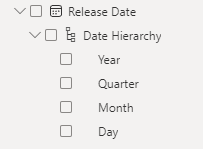
However, is this always enough? In my experience. no.
In addition, we may sometimes want to use multiple versions of a date table as a Role Playing Dimension – having our own allows us to do this more easily.
Go on then, where’s this Date Dimension?
I’m glad you asked.
Here’s the code – let me show you how to use it.
let
    StartDate = #date(2020,1,1),
    EndDate = #date(2023,12,31),
    DateList = List.Dates(StartDate, Number.From(EndDate) - Number.From(StartDate), #duration(1, 0, 0, 0)),
    DatesAsTable = Table.FromList(DateList, Splitter.SplitByNothing(), null, null, ExtraValues.Error),
    #"Renamed Columns" = Table.RenameColumns(DatesAsTable,{{"Column1", "Date"}}),
    #"Inserted DateInt" = Table.AddColumn(#"Renamed Columns", "DateInt", each Text.Combine({Date.ToText([Date], "yyyy"), Date.ToText([Date], "MM"), Date.ToText([Date], "dd")}), type text),
    #"Inserted Year" = Table.AddColumn(#"Inserted DateInt", "Year", each Date.Year([Date]), Int64.Type),
    #"Inserted Month Number" = Table.AddColumn(#"Inserted Year", "Month Number", each Date.Month([Date]), Int64.Type),
    #"Inserted Day" = Table.AddColumn(#"Inserted Month Number", "Day of Month", each Date.Day([Date]), Int64.Type),
    #"Inserted Day of Year" = Table.AddColumn(#"Inserted Day", "Day of Year", each Date.DayOfYear([Date]), Int64.Type),
    #"Inserted Quarter" = Table.AddColumn(#"Inserted Day of Year", "Quarter Number", each Date.QuarterOfYear([Date]), Int64.Type),
    #"Inserted Quarter Name" = Table.AddColumn(#"Inserted Quarter", "Quarter Name", each "Quarter " & Number.ToText(Date.QuarterOfYear([Date])), Text.Type),
    #"Inserted Quarter Name Short" = Table.AddColumn(#"Inserted Quarter Name", "Quarter Name Short", each "Q" & Number.ToText(Date.QuarterOfYear([Date])), Text.Type),
    #"Inserted Year Quarter" = Table.AddColumn(#"Inserted Quarter Name Short", "Year Quarter", each Number.ToText(Date.Year([Date])) & " - Q" & Number.ToText(Date.QuarterOfYear([Date])), Text.Type),
    #"Inserted Month Name" = Table.AddColumn(#"Inserted Year Quarter", "Month Name", each Date.MonthName([Date]), type text),
    #"Inserted Month Name Short" = Table.AddColumn(#"Inserted Month Name", "Month Name Short", each Date.ToText([Date], "MMM"), type text),
    #"Inserted Day of Week" = Table.AddColumn(#"Inserted Month Name Short", "Day of Week", each Date.DayOfWeekName([Date]), type text),
    #"Inserted Day of Week Short" = Table.AddColumn(#"Inserted Day of Week", "Day of Week Short", each Date.ToText([Date], "ddd"), type text),
    #"Inserted Day of Week Number" = Table.AddColumn(#"Inserted Day of Week Short", "Day of Week Number", each Date.DayOfWeek([Date], Day.Monday) + 1),
    #"Inserted Week of Year" = Table.AddColumn(#"Inserted Day of Week Number", "Week of Year", each Date.WeekOfYear([Date]), Int64.Type),
    #"Inserted Week of Month" = Table.AddColumn(#"Inserted Week of Year", "Week of Month", each Date.WeekOfMonth([Date]), Int64.Type),
    #"Changed Type" = Table.TransformColumnTypes(#"Inserted Week of Month",{{"Date", type date}})
in
    #"Changed Type"
How to use this code
Put simply, this needs to be copied into Power Query as a new table. Follow these simple steps:
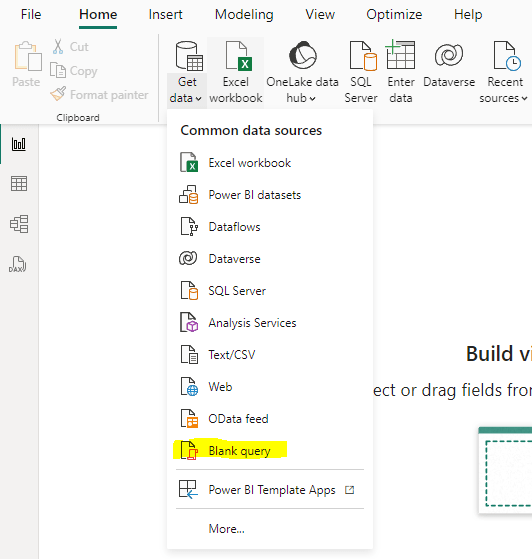
- In Power BI, click Get Data and Blank Query:
- At the top of the Power Query screen, click Advanced Editor:
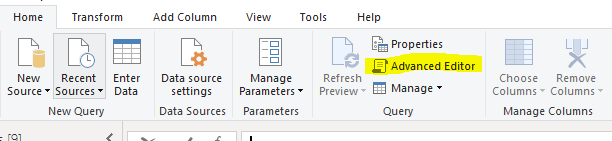
- In the popup that appears, paste the code above and click Done
And there it is! You can rename this to whatever you like – I prefer Date Dimension, but it’s your call.
At this point, with your table selected, under Table Tools click Mark as Date Table and make sure to choose the Date column as the column to be used:

And that’s it! Enjoy!
 Jammos Analytics
Leave a comment